ASTA Palm Chart Wizard
Now with only a few clicks of your mouse you can bring your enterprise to the next level of wireless PDA productivity with ASTA's new Palm Chart Wizard.
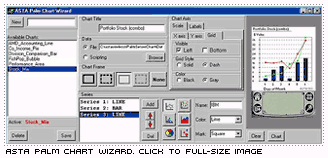
It really simple, just activate ASTA's server side Charting Wizard, define the properties of your chart, including:
- Chart Title (Optional)
- Series type (Line, Scatter, Bar, Area, Pie and Bubble)
- Series parameters (name, color, mark shape, etc.)
- Grid preferences
- Label preferences
- X and Y axis preference
- Data source (currently accepting comma delimited files)
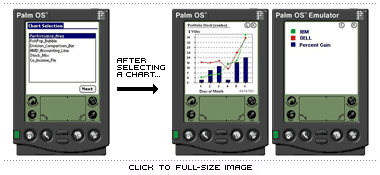
Then name and save your new Palm Chart and that it! On a PDA wireless login your users can be presented with a list of server side defined charts (using Palm Chart Wizard) or a subset thereof as shown below. On selecting a chart name in the "Chart Selection" window the selected chart is quickly displayed on the palm. All charts have an associated legend that can be activated by clicking on the button labeled "L" shown in the image below. Then by clicking on the button labeled "C" the PDA user is returned to the previously viewed chart.
|